Amid the AI frenzy, there is a lot of conversation about how business users will use agentic chat to answer business questions rather than interactive, dashboard-style reports. Is there truly a shift in the industry, and is agentic analytics going to change the way most business users consume data?
Just how viable is the whole “chat with your data” option, and is it really a replacement for conventional reporting? I recently heard a VP-level leader at a large consulting firm say something to the effect of “we need to stop investing in dashboard-building skills and focus on creating AI-driven data analysis solutions for our consulting customers.” I’m paraphrasing from memory, but that was the sentiment. Are all business leaders across the industry giving up their dashboards, interactive visual reports and scorecards in exchange for AI chat? No. Of course they aren’t — but conversational analysis is a new way to consume business data.
Feedback from customers indicates that many users are becoming accustomed to the agentic chat experience and will use Copilot and other agentic chat services to perform research and analysis, but this won’t entirely replace dashboards, interactive visuals and operational reports. It’s a different mode of communication. Stepping away from computer interaction, think about the way people have been analyzing business data for decades. The conversation might start with a line chart showing historical trends and projections, which then prompts a leader to ask a specific question like “how are foreign markets and the price of tea in China affecting our revenue this week?” The line chart is still important for spotting trends, making comparisons and resonating with visual thinkers, but AI really excels at answering very specific questions without the need to create a one-time, custom report.
I started playing with the Copilot-on-Power BI chat feature about a year and a half ago (late 2024) when it was first introduced. At the time, frankly, it wasn’t very impressive, but it has matured quickly, and I have since worked with and alongside several customers and other AI/BI developers with promising results. Today (mid 2026), AI-driven analytics is reaching a level of maturity that organizations can begin to rely on.
To focus the topic, we’re not talking about using agents to develop reports or data solutions, and we’re not talking about using ChatGPT or Claude to provide answers sourced from the Internet. This is about using Copilot or other agentic chat to analyze data from an organization’s internal, curated data stores.
Performance Considerations
Working with Power BI users who are experiencing Copilot for the first time, a common reaction is that it takes longer to chat with Copilot than to perform simple report interactions. That’s true — users have become a bit spoiled by Power BI’s impressive performance, and chatting through Copilot is a different experience.
Semantic Model Interaction is Fast
With a well-designed semantic model, query response times are often measured in milliseconds. Power BI has set the performance bar very high, as users have come to expect report visual interactions to be nearly instantaneous. Report visuals that take more than a few seconds to respond to user interactions are generally considered slow and unacceptable.
One reason this level of performance is possible is that the report and semantic model typically execute within the same environment. When both are published to the Power BI or Microsoft Fabric service, they often run on the same or closely connected infrastructure within a Microsoft data center. As a result, DAX query execution incurs minimal processing overhead and virtually no network latency.
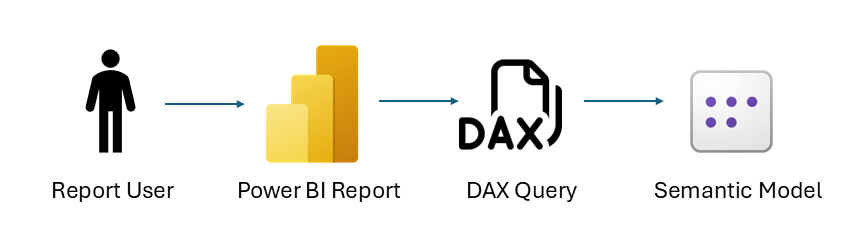
When a user interacts with a report visual, the generated DAX queries and their results remain within the Power BI/Fabric service and are not transmitted over the Internet. Instead, only the rendered page updates—typically small blocks of HTML, JSON, and visual-rendering payloads—are sent to the user’s browser. Over a typical broadband connection, these updates are usually perceived as instantaneous—or at least very fast.
Optimize the Semantic Model First
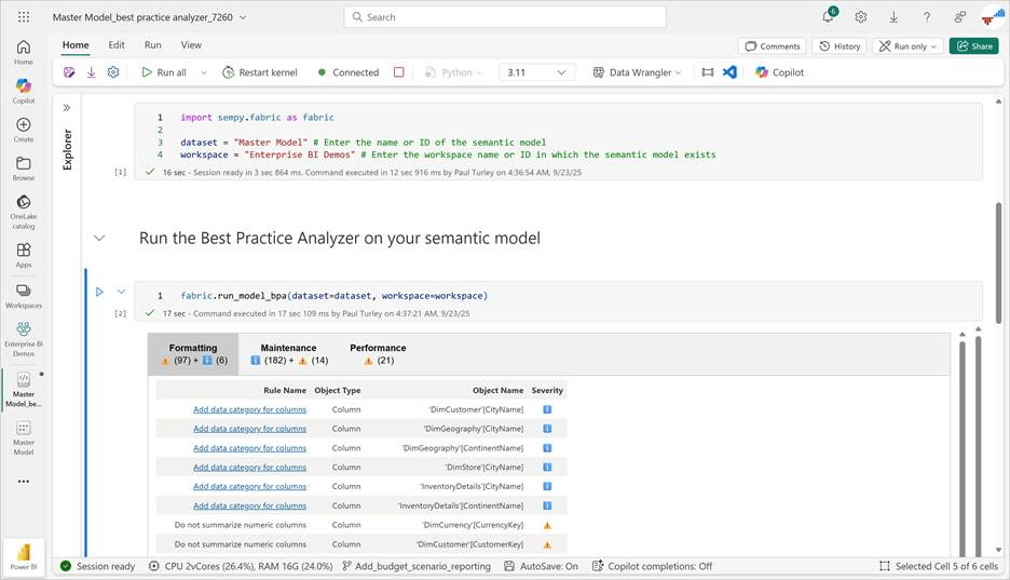
This introduces the first and critical stage in the Copilot optimization process… Semantic models must be streamlined for high performance and adhere to the guiding principles of Power BI semantic model design. Namely, the model MUST be dimensional and apply foundational best-practice design patterns—period. If you are not intimately familiar with Power BI model best practices, start here: Power BI Fabric Patterns: Model Design Checklist—and don’t go down the dark path of layering agents and Copilot over poorly designed models. Run the Best Practice Analyzer from the Fabric browser semantic model designer to make sure models are ready for AI.
AI Interaction Introduces Latency
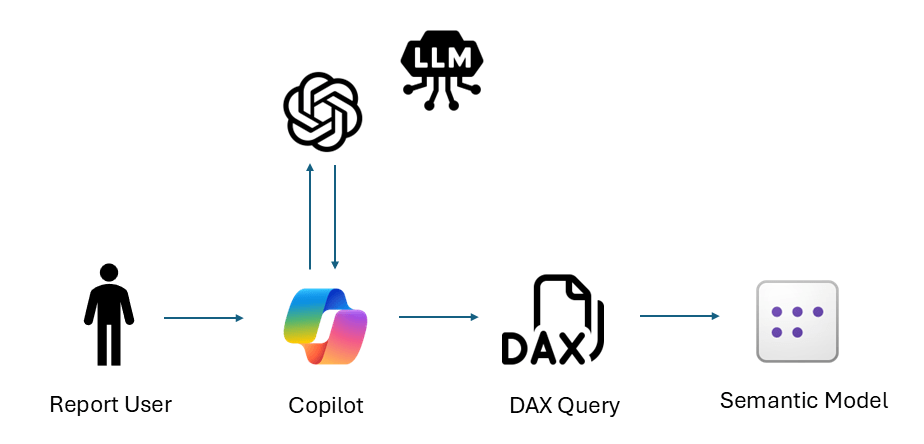
Copilot doesn’t send data over the Internet, but the AI conversation and query preparation introduce network and processing latency. When a user submits a prompt to Copilot, the request is sent to the cloud-based Azure OpenAI Service, which is powered by a large language model (LLM). After a semantic model is selected—either automatically by Copilot or explicitly by the user—Copilot retrieves metadata from that model and uses its Natural Language to DAX (NL2DAX) capability to generate a DAX query that references the model’s tables, columns, and measures. The generated query is then executed against the semantic model, and the results are returned to the user.
Because communication with the Azure OpenAI Service occurs over the Internet and the AI service must “think” before responding to a prompt, both prompt processing and response generation can take time—and more challenging prompts require more AI processing. For example, the AI interaction may take approximately 30 seconds to interpret the request and generate an appropriate DAX query. If execution of that query against the semantic model takes an additional 5 seconds, the total response time experienced by the user would be about 35 seconds.
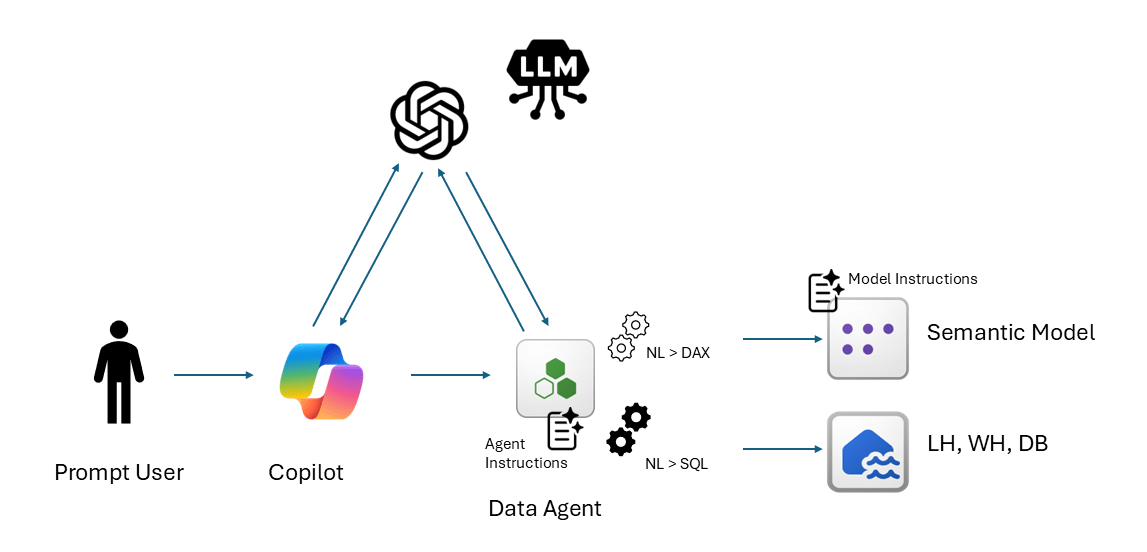
One way to reduce model-selection time and optimize query preparation is to use a Fabric data agent to help ground the model for faster, more reliable query results. In this scenario, Copilot still opens an Azure OpenAI session and has an initial conversation with the LLM but quickly hands the conversation over to the data agent. Think of it like the phone menu when you call your bank or phone provider. Rather than working through all the branches of the phone menu tree, you get routed to a specialized agent who has special training and instructions to handle your specific category of questions. If the agent has already been directed to the right data and trained with suitable instructions, it will be better prepared to address your question and formulate an optimized query.
Remember the old TV commercials that said, “operators are standing by…”? Maybe you’re not that old, but I am, and I do. When a Fabric data agent is created and directed to a specific semantic model at design time, it ingests the model’s metadata and learns how to interface with the model prior to the first user’s chat conversation. That’s step number one. The second step in the design and optimization process is a set of grounding instructions that help the agent more effectively translate prompt words, phrases and questions into a directed query. Instructions for a semantic model connection are actually stored in the semantic model, not in the data agent, but they serve the same purpose.
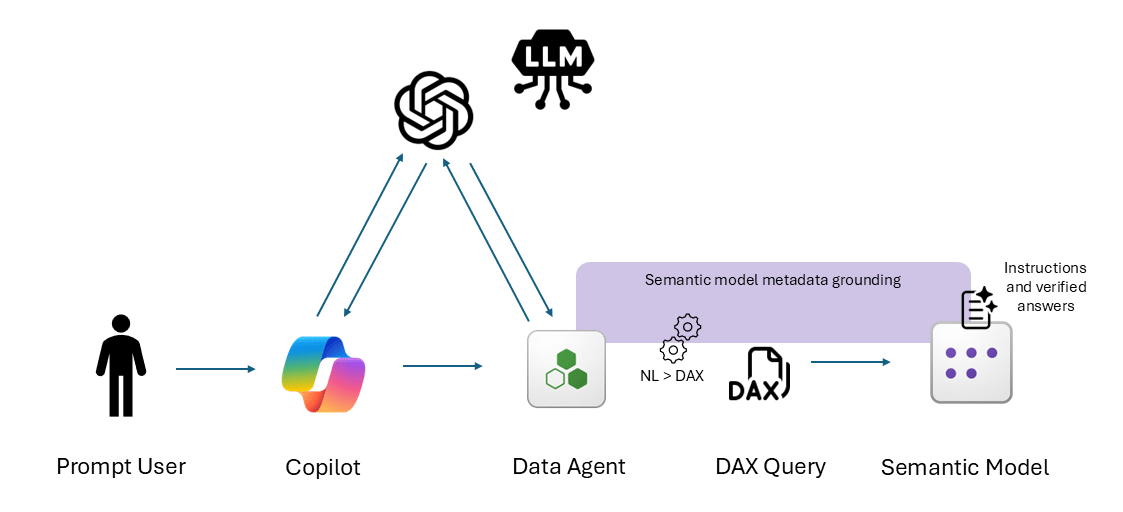
A data agent can be connected to more than one data source. This could include multiple semantic models or a combination of sources, like a Fabric lakehouse, warehouse or SQL database. Instructions stored in the data agent help it play switchboard operator or traffic cop (yeah, I know… those are both outdated references, but hopefully you understand the analogy). An instruction might be “For questions regarding Revenue or Profit, use the Fiscal Revenue Reporting semantic model.” Another could be “For questions about Invoice Details, use the Invoices table in the Online_Transactions database.” When a user asks a question in either context, the agent can send the query—and the appropriate type of query—to the right data source.
Agent instructions used to direct queries to the semantic model are stored as metadata in the agent, and instructions used to help the semantic model understand a prompt that are directed to it are stored in the semantic model.
In Summary
Conversational AI won’t replace your Power BI dashboard style reports—but it’s a powerful new way to query and analyze data using common language and business terms. AI rocks at conversational communication, understanding and translating nuanced questions into query language, but it can’t natively do the same kind of mathematical analysis and number crunching as a Power BI semantic model – which is why they can work well together. We should understand the behavior of Copilot and Fabric data agents and how they perform over semantic models, where the latency comes from, and how to optimize for it.
More to Come
This is one of those blog posts that I started drafting months ago, and it grew and grew as I wrote it—meaning I have a lot more to say on this topic – and would like to share some collective experience as best practices are emerging.
First of all, I’m interested in hearing about your experience, your questions and your thoughts on this subject. Secondly, I plan to continue and talk more about how Power BI, Copilot and data agents are used in special-purpose applications and specialized use cases.
How can Copilot and other AI tools be used to develop optimized semantic models and to enhance existing models for AI-enabled consumption? How can we automate testing and validation to ensure that Copilot gives reliable answers when users chat with your business data? We’ll get into how to verify, tune and test agentic BI solutions in a follow-up post.

When implementing AI agents, start with a narrow scope (like FAQ handling) and expand gradually. Trying to automate everything at once usually leads to a poor experience.
Such a timely topic. Copilot and Data Agents can make Power BI feel much more approachable, but the performance angle is easy to underestimate—especially when the semantic model design, measures, and context are doing the real heavy lifting behind the scenes. I like that the title frames optimization as part of the conversation, not an afterthought. For teams thinking about AI-assisted tooling more broadly, small customization projects can also help people understand how metadata and assets fit together; Codex Pets has a practical guide here: https://codex-pet.org/how-to-create-a-codex-pet/ Loading…
Thank you for writing this.
As long as you drive the car, you want a dashboard that doesn’t randomly place the numbers you need every day.
Clearly, voice assistants in cars are very welcome support, but imagine asking the speed every 20 seconds…
Every tool has a role. As long as you run the company, of course… 🙂
I love the analogy, Marco.
Although I do enjoy talking to my car and it doesn’t have a dashboard. Maybe times are changing.
Such a timely article. As a trainer, I am increasingly being asked how we can integrate Co-Pilot into our work within Power BI. It really is hard because as an educator, I want people to understand the basic concepts first.
The DAX expressions in a semantic model rely on the filter context, when using multiple semantic models to answer one query, who is managing the uber context defined by filters on the separate models?