I just read that the Miss Universe contestant from Panama was evicted from the Miss Universe pageant. I don’t know what she did, but it was apparently bad enough to get kicked out. She was hot and she was popular, but she’s been evicted.

On that note, let’s talk about memory management for Microsoft Fabric Direct Lake semantic models…
One of the most impressive aspects of Power BI, in my view, is that is built on top of the SQL Server Analysis Services semantic model engine. It is an impressive analytic data engine that has been known by many names over the years such as: VertiPaq, xVelocity, Tabular, Power BI Datasets, Power Pivot, AAS, SSAS, and even OLAP Services in its earliest form, when it was originally adopted by Microsoft in 1997. The semantic model engine has grown up quite a lot since then, and the core product team who devised and improved it over the years are still at it today; a testament to their dedication and commitment to “the little engine that could.” Originally optimized for on-disk storage, the modern “in-memory” incarnation is engineered to make the most of as little memory as possible. But how can large data models use relatively little memory?
One of the ever-present challenges for organizations with large data sets is the need to be very selective about what data to include in an analytic data model. For interactive Power BI reports to perform well, data must be modeled dimensionally and large tables with a lot of data must have few and narrow columns – that’s a fact! (pun intended).
One of the core best practice guidance principals for Power BI modeling is to avoid including columns that aren’t absolutely necessary for analytic reporting. Every column uses precious memory and especially long, unique values that don’t compress very well. When consulting clients bring me large models that require expensive capacity licensing and pose report performance issues, my first inclination is to see what column data can be carved out of the model; and perhaps moved to another table for a drill-through report.
The product team came up with a very clever way to reduce the in-memory footprint of a Direct Lake semantic model: hold a popularity contest! The semantic model engine will only keep columns in memory based on their hotness. I mean this literally…

How does it work? In the new Direct Lake semantic model engine, each column has a TEMPERATURE property, used to rate the column’s popularity based on how often it is used in queries, and how important it is to support user interactions in reports. A column’s “hotness” is an indication of the frequency and recency that the column is referenced in a DAX query. Columns that are queried more often are considered to be “hotter” than columns that are queried less frequently. Columns that are queried less frequently or that haven’t been queried for a while are considered to be “cooler”.
In my high school, the “cool kids” were usually thought to be more popular but apparently the opposite is true in this case.
In all seriousness, as I have worked with enterprise clients with large data models, the Direct Lake storage mode is an attractive option. Direct Lake is not a silver bullet, as I mentioned in this post, and should be carefully weighed against the advantages of Import mode and composite models. But it is an option that breaks barriers not before possible when working with large data volumes. Let’s a take a quick look.
I built the Direct Lake semantic model, sm_ContosoDW_Analytics on the lakehouse here named lh_ContosoDW_Analytics. The lakehouse uses up about 20 GB of storage. Not every table nor column in the lakehouse was added to the model but it could potentially take up a few gigabytes of RAM if it were all loaded into memory.

Before I query the model, I will run a schema query to check the temperature of each column. As you can see, no columns in the model currently have a TEMPERATURE value and none are showing as ISRESIDENT. That means they haven’t moved in yet. At this point, the semantic model is not using any memory in my capacity. All of my available compute units (CUs) and RAM are available for other processes.
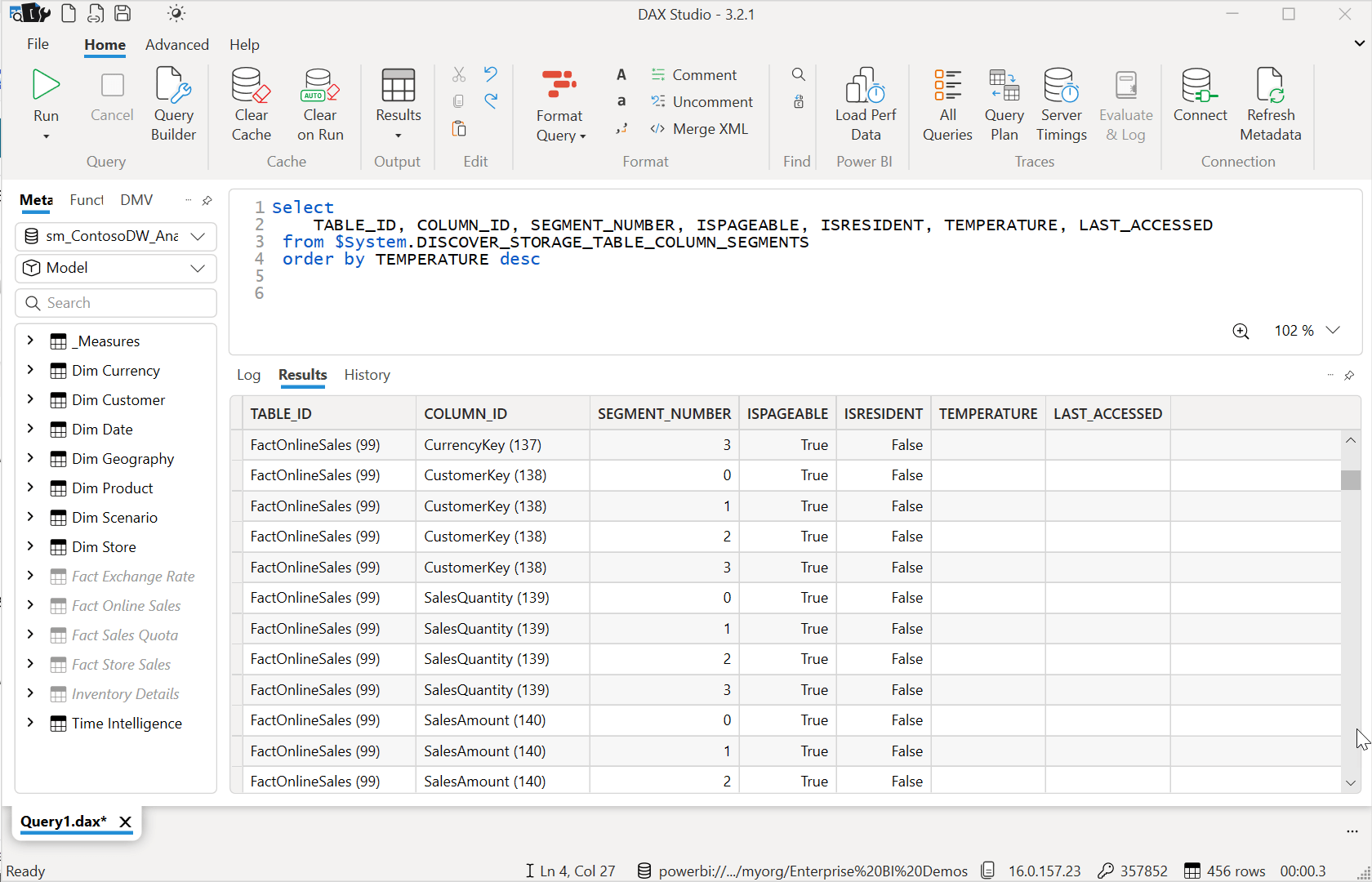
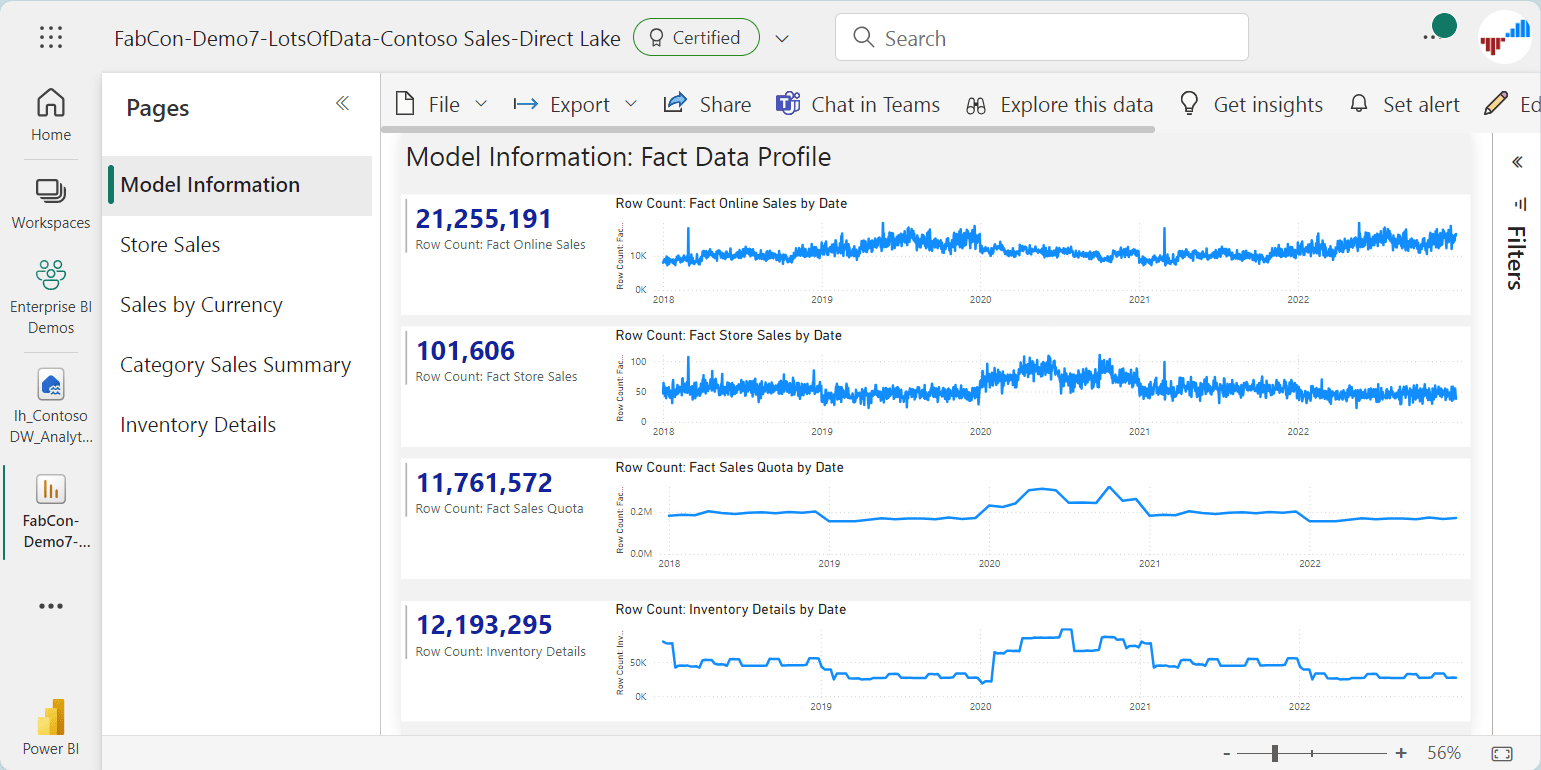
Now, let’s open a Power BI report, which of course will run a DAX query against the model. Before I show you the results, take a few seconds to guess which columns are used most frequently and are the most valuable to support these visuals.
The page you are looking at contains eight visuals, fours cards and four line charts. That means that eight different DAX queries were issued to the model engine. The cards issued simple queries that return a scalar value without grouping. The line charts issued queries that were grouped and sorted by the date key column in their respective fact tables and returned the date and year column values from the date dimension that is commonly shared by all four fact tables.
Waiting for the columns to be loaded into memory, a process known as transcoding, took about 3 seconds. After that, this page comes up in a blink of an eye, even if it is filtered.
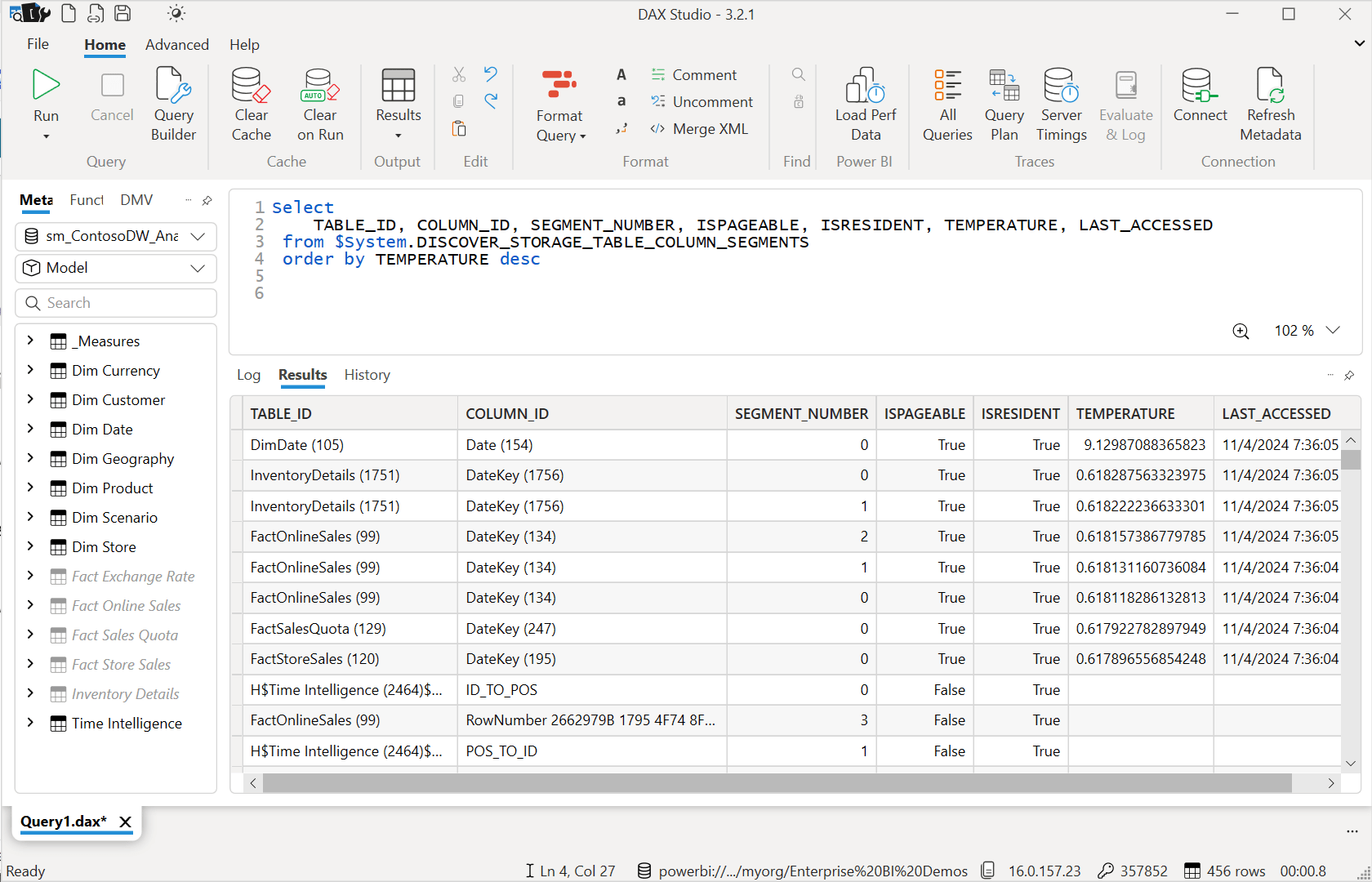
Running the schema query in DAX Studio again, I get different results that confirm the earlier observation. What’s the most important column? The Date column in the DimDate table has a TEMPERATURE rating of 9.129. That’s the hot one that won this popularity contest. The modeling engine is going to prioritize keeping that one in memory before it considers evicting any others.
Let’s run some more queries. I’ll visit a few different report pages and interact with some visuals – then rinse and repeat the exercise. Here are the schema query results afterward:
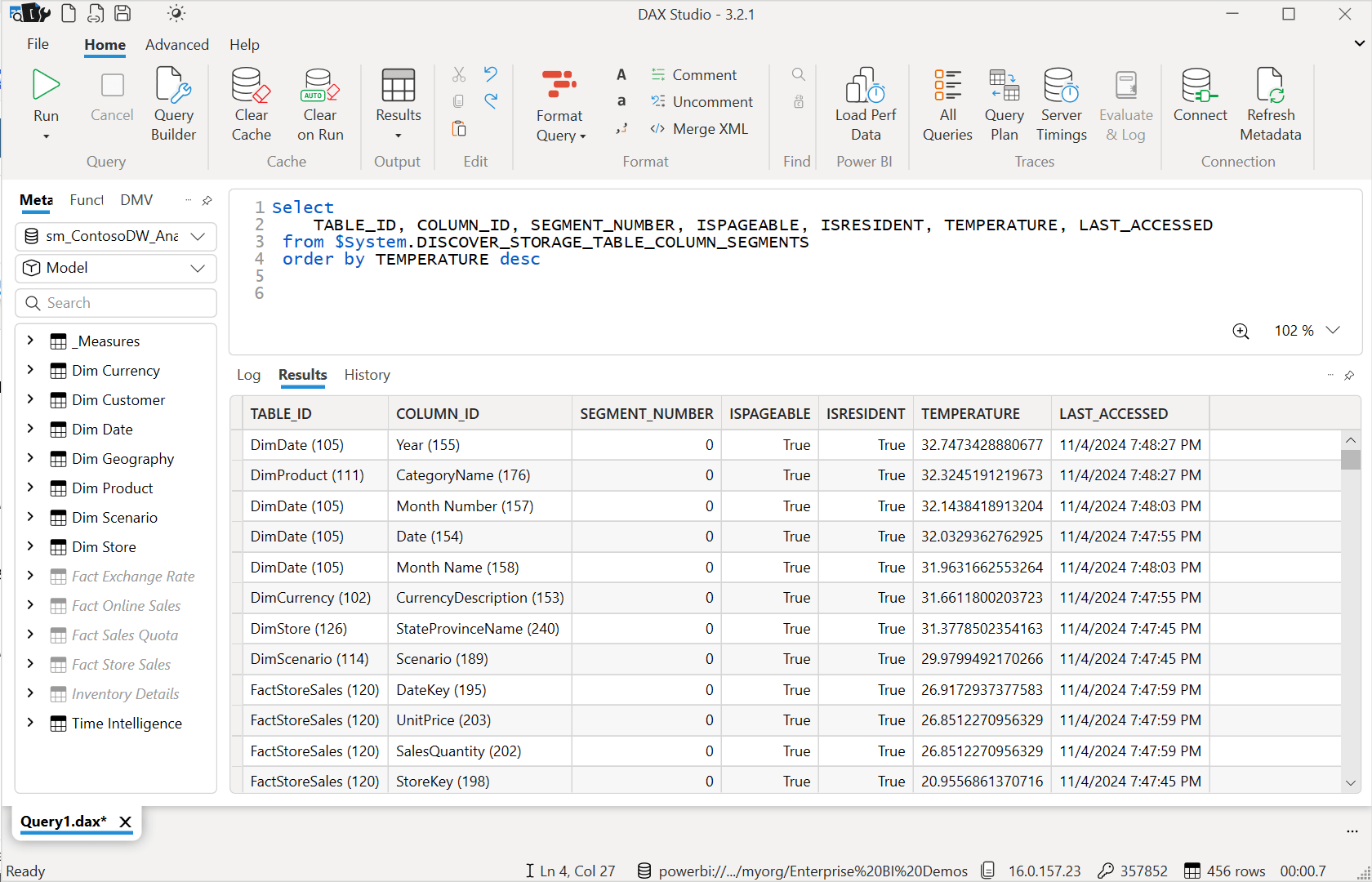
As you can see, things are heating up and there is more competition among the columns for popularity. If there were a lot of activity in my Fabric tenant caused by workloads in the workspaces assigned to the same capacity, this would create memory pressure and demand for the resources being used by this model. At some point, the semantic model engine would begin to evict columns from memory that have a lower TEMPERATURE than others – the losers of the popularity competition. Eventually, in a matter of minutes to hours, all columns will be evicted if the model reaches an idle state. There are many factors that effect this process so consult the Microsoft Learn documentation if you would like some light reading on the topic: Direct Lake overview – Microsoft Fabric | Microsoft Learn
What have we learned since implementing Direct Lake models?
There is a penalty for this optimization in Direct Lake and that is that it can take a few seconds for the initial load and column transcoding into memory to take place. The first user to hit the report will typically pay the price for others. Import mode will always be faster at first since this transcoding thing isn’t needed for models that fit within the memory space supported by your capacity. If your priority is optimal performance and you are not worried about running out of memory, maybe you don’t need to make the switch to Direct Lake.
Another big learning is that the timing and conditions for column eviction aren’t entirely predictable. The Fabric service uses difference metrics and criteria to perform column eviction and DirectQuery fallback but it is not a trick than can be performed on command.
We recently conducted an assessment for a large client who want to move large models from AAS to Direct Lake in Fabric. We replicated a large model in both Import mode and Direct Lake, making a point to run queries that would eventually hit the memory limit and either failover to DirectQuery or fail altogether. We discovered that in a demo scenario, if I were to deliberately run a bunch of queries, causing more columns to be loaded/transcoded and drive-up memory usage; column eviction didn’t always take place consistently enough to avoid an error. However, outside of testing and quick demos, with regular usage over time, eviction and transcoding took place at a pace to keep up with user requests. This behavior is likely to improve with time as the Fabric product team continues to improve the platform.
So, can you use Direct Lake to handle 100 GB of total data volume (considering all columns in the model) on a capacity limited to 25 GB per model? Possibly. There are scenarios where the dynamic column-swapping nature of the engine will handle this but there will always be the possibility of queries trying to load new columns before the old ones can be evicted.
In all, Direct Lake performance is not quite as fast as Import mode. The first time it can take a few seconds and then things might be “almost as fast”, say within 20% as fast as Import mode. In our testing, Direct Lake was consistently four or five times faster than DirectQuery and Import mode was consistently 10-20% faster than Direct Lake.

One thought on “Direct Lake memory: hotness, popularity & column eviction”