It’s time for a refresher and reboot on this important topic. Much has changed in the Power BI world, and although the core design principles remain the same, practices and architecture patterns have evolved over the past few years. Power BI has grown up in the enterprise space and Microsoft Fabric now adds new options and capabilities. When speaking to customers, I am frequently reminded that they continue to face the same challenges and often make the same mistakes when designing Power BI solutions.
Back in 2020, I began writing a series of blog posts titled “Doing Power BI the Right Way” and it has become my mission to evolve and maintain a current collection of the most important best practice recommendations. This has been my passion and topic of several conference talks, user group sessions and a book currently in development for O’Reilly that will help you prepare for the 2025 revisions to the PL-300 Power BI Analyst exam and then guide you apply enterprise best practices in your solutions.
I work with hundreds of consulting clients who go through the same cycles, having the same experiences, facing the same challenges, many making the same mistakes, and many learning some of the same lessons. The purpose of this series is to share those lessons with you.
Universal Best Practices
If we sum up Power BI best practices at the highest level, it is that all projects of any scale and size should adhere to the same general set of guidelines, categorically. Your Power BI project no matter how small or large should address every category in the following list. The specific design patterns and practices will vary significantly depending on scale and purpose. The following guideline categories will frame this and related future posts in this series:
- Manage Power BI projects with version control
- Iterative continuous delivery
- Business requirements focused design
- Use and promote trustworthy data sources
- Design to scale
- Efficient query design
- Parameterized connections & volume control
- Document objects and code
- Business friendly naming standards
- Dimensional model, exceptions as needed
- Calculate in context
- Data-first visualization
- Summarize first, navigate to details
- Style, brand and theme reports as appropriate
- Design to assessibility standards
- Balance form, fit and function
- Use the right report type, with navigation
- Testing, validation, governance and adoption
- Move data ownership upstream as needed
Granted, some of these categories are less applicable to small, informal projects and in certain cases, many of us (me included) might just blow them off entirely. But we do so with the understanding that we are knowingly cutting corners and taking on risk. That’s life. I’ll give examples as we get into the details.
Different Project Scales & Different Rulebooks
One size does not fit all, and we can’t move forward without framing the type of solution you are planning to build, and your role in the development process. To narrow this down, I’ve organized Power BI project into three different categories. The first category is citizen-developed reports – developed by a business user for business users. I taught a Dashboard In A Day (DIAD) class last week for the first time in a few years, and it was a huge wake-up call and a reminder that citizen developers need to solve a specific business problem as quickly as possible and are not naturally mindful of things like reusable data and centralized business rules. However, there is value and a purpose for self-service reports; and there can be a path from data silos and chaos to analytic reporting in a governed environment.
Citizen developed Power BI reports are created to meet a user’s report needs within the scope of a single business process and without the intention to certify the model or report for general use within the organization. Data governance and durability are not the primary focus and every best practice in the guidelines list applies but with the goal of keeping things simple and uncomplicated.
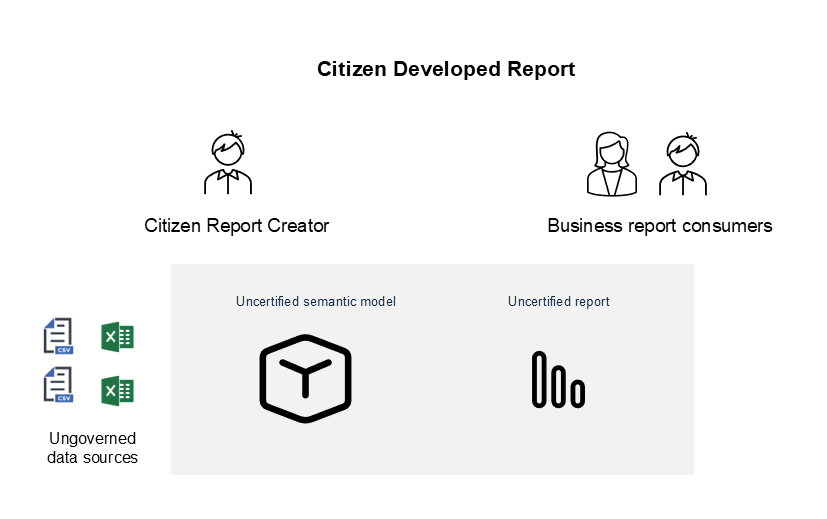
For citizen-developed solutions to be future-proof, they must fit into the organization’s data governance strategy. In short, consider that there are two very valid possible directions for a citizen-developed Power BI model/report project that uses data from an ungoverned data source:
- The Power BI model & report resides in a workspace reserved exclusively for a small group or business unit with a limited audience. It serves its purpose as an “uncertified” report by meeting a specific business need and may be retired at some point in the future.
- The organization’s data governance board, Center of Excellence or central data team will work alongside the business to transition the solution to the central, trustworthy data sources. The semantic model and report are tested and validated, transitioned from uncertified to certified Power BI assets.
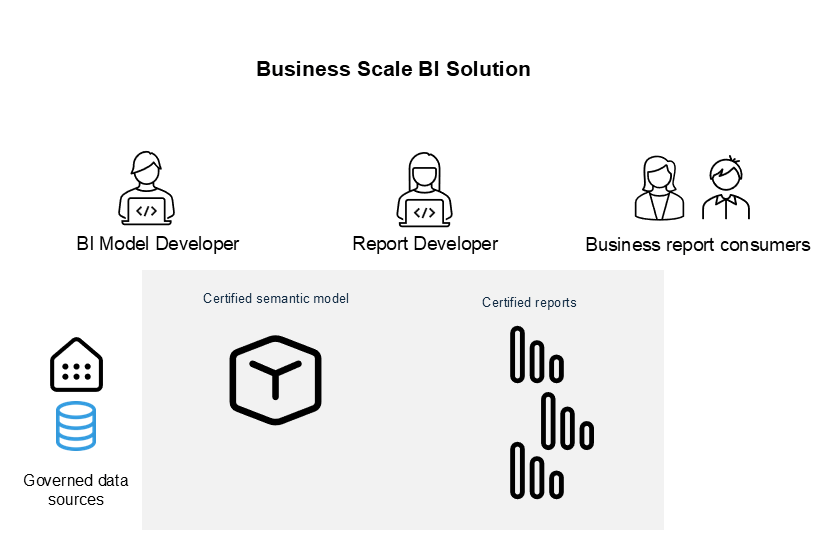
Business scale Power BI solutions begin with the intention to certify them as governed solutions. If the organization is a well-oiled data governance machine with centrally managed, trustworthy data in a “gold layer” warehouse, mart or lake house, a disciplined data model developer can create a shared and certified semantic model to be shared by multiple Power BI reports. The certified model is verified to conform to best practice standards by the organization’s data governance board or CoE. Verified models and report are endorsed as certified and shared with the business.
Enterprise scale solutions include the scope of data movement and data engineering upstream from Power BI. At-scale data is shaped and transformed with the goal to deliver analytic reports and might include other reporting and analysis capabilities. For example, data may also be used for AI analysis or to train machine learning models.
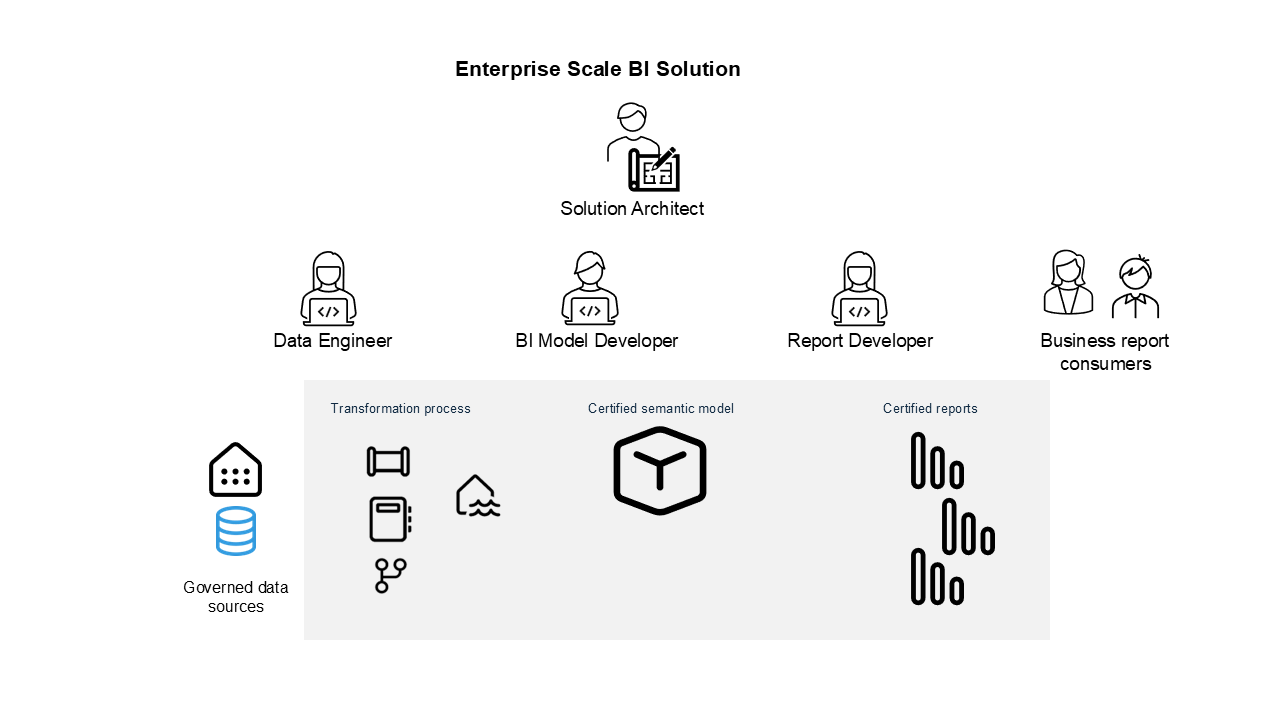
Enterprise-scale solutions are typically owned and managed by a solution architect and IT developers. They prioritize code reuse, version control, iterative continuous delivery and a more rigid requirements-driven process than business or citizen-developed Power BI solutions. All models and report will use governed data and will be certified by the business. Same best practice guidelines… different scale, and different focus.
In the following related articles and posts I will discuss the application of each best practice guideline for each of these BI project categories:
(links to articles as they are completed)
- Power BI projects with version control
- Iterative continuous delivery: Power BI & Fabric
- Power BI Business requirements focused design
- Using and promoting trustworthy data sources in Power BI
- Designing Power BI & Fabric solutions to scale
- Efficient query design in Power BI & Fabric
- Parameterized connections & volume control in Power BI
- Document objects and code in Power BI
- Business friendly naming standards in Power BI
- Dimensional modelling and beyond in Power BI & Fabric
- Calculate in context
- Data-first visualization
- Report navigation: Summary & details
- Power BI report styling, branding and themes
- Reporting form, fit and function
- Use the right report type, with navigation
- Power BI & Fabric governance and adoption
- Power BI testing, validation & certification
- Transitioning Power BI project ownership

Still reading the article for now but I would like to mention that this morning when I saw the email with this content I also got 13 more separate emails with Header lines but no content from “Styling and Branding in Power BI ” to “Continuous Delivery & Version Control in Power BI “. The last one has some bullet points, notes toward later content maybe. Seems like you showed your planned content. Glad to see you plan to be around a while, watch out for buses.
Scott, I’m so sorry. I was using a different app to outline draft posts which I often do when I brainstorm ideas for posts. I accidentally posted them before moving them back to draft versions. That was an “oh $#!1” moment.
OUTSTANDING ARTICLE.
THANK YOU, THANK YOU !