



Hello, friends. I’ve spent the past few months working with several new Fabric customers who were seeking guidance and recommendations for Fabric architecture decisions. What have we learned about using Fabric in enterprise data settings in the past 11 months? This post covers some of the important decisions points and Fabric solution design patterns.
Much of the industry’s experience with Microsoft Fabric over the past several months has been at a high-level as organizations were dipping their toe in the pool to test the water. So far, our Data & AI team have assisted around 50 clients with Fabric projects of various sizes. We have also implemented a handful of production scale projects with enterprise workloads, comparing notes with community leaders and the product teams who develop the product. What lessons have we learned?
Choose your metaphor: Peel the onion, dip your toe in the pool… we are all learning as we go and approaching Microsoft Fabric a little at a time but now getting into the thick of it as the platform approaches one year since GA release. The primary interest for Fabric by far is modernizing an organization’s data warehouse for analytic reporting. Fabric offers other workloads like streaming data, event alerting, and data science but these are secondary interests for most of our clients.
With the focus on modern data warehouse, Lakehouse architecture and analytic reporting, best practices are emerging, and critical lessons are being learned. Part of my job is to lead presentations, architecture reviews, and workshops with company leaders about the benefits of Microsoft Fabric. After dozens of these sessions, we have a much better idea about the right fit for Fabric and how to approach planning for successful adoption.
Embrace OneLake
Fabric is based on the premise that data should be accessible from one unified data storage platform. OneLake is literally one place to securely manage all data where it can be available to any asset within Fabric. Behind the scenes, OneLake uses Azure Data Lake Gen2 Storage, but you won’t see it in your Azure tenant, and you don’t even need an Azure services account to use Fabric. It’s easy to move data into OneLake and easy to access it without complicated drivers and APIs. The OneLake paradigm doesn’t even require that you make a copy of source data files. Shortcuts allow file-based data to remain at the source and provide “virtual copies” that appear as files and tables in a fabric Lakehouse. Shortcuts can be created for Amazon S3 buckets, GCS and S3 compatible services. There are hundreds of connectors, and the list of connectivity options will continue to grow but you should test and validate any unknown data sources. Data hosted behind private network endpoints may be accessible, but some require firewall configurations and virtualized connectors.
You can create shortcuts to many types of files stored outside of Fabric OneLake which then show up as a virtual table in a Lakehouse. A prime example of the Onelake shortcut concept is in a new feature for developers who use Azure Databricks to store their data. Rather than copying data from a Databricks catalog, an Azure Databricks mirror makes the entire catalog appear as if it were in Fabric, allowing efficient Direct Lake semantic models to be created without importing any data.
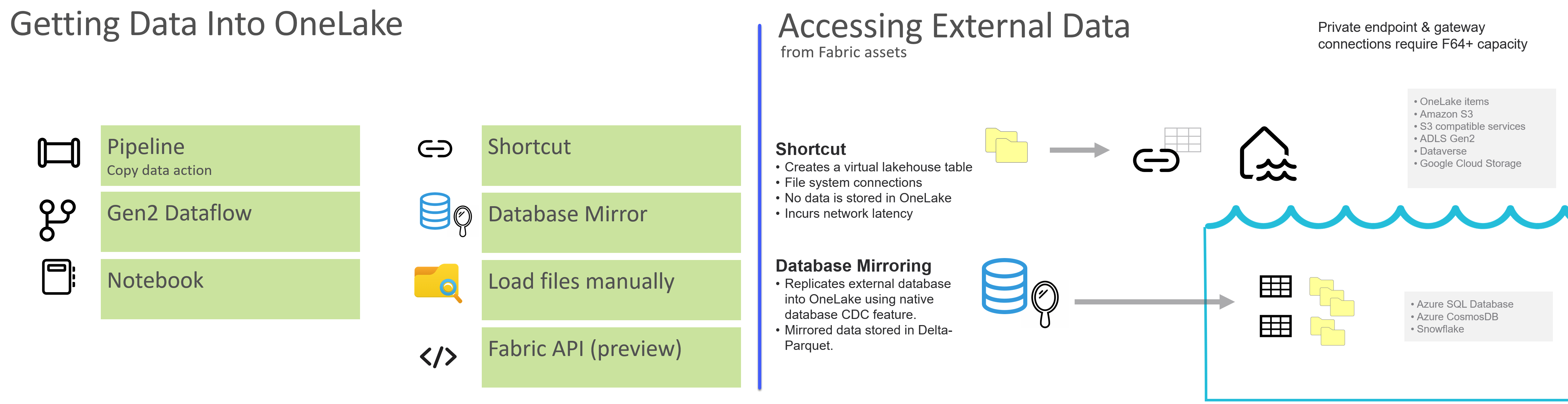
I’ve talked to IT professionals who were deeply committed to data lake or data warehouse platforms hosted in AWS. They had the idea that Fabric would be a good choice to transform data and then push it back out to their external data product for use with other tools outside of Fabric. That just didn’t make sense. The goal is to simplify your data platform and not to add yet another set of tools. Moving data between clouds can be slow and inefficient. Fabric is not a data transformation tool optimized to push data into another platform like Snowflake or AWS Redshift.
Advice:
Embrace Fabric. If your organization has already committed to using a competing cloud platform, data warehouse and ETL toolset; make sure Fabric is right for you. Fabric tools can easily consume data from many external sources, but you should commit to a data platform and use the tools optimized for it to run efficiently.
Choose Your Data Engine
Fabric includes two data compute engines: Spark and SQL for the Fabric warehouse. you can effectively use both, but many shops will lean toward one or the other. If you are a SQL Server shop and most of your developers are accustomed to writing TSQL queries, creating stored procedures and DDL code for database management… great. Use a Fabric data warehouse in your gold layer and manage your heavy ETL work using TSQL. If your developers prefer Python and you are more comfortable managing data in the less-structured data lakehouse environment, use a Fabric Lakehouse with Spark notebooks.

Spark is an extremely fast and scalable engine that is typically utilized from Spark notebooks with code written in PySpark. You may also use Scala and SparkSQL code. Notebooks have quickly become the preferred method for data movement in the opensource big data world. Aside from Python, and you can also run notebooks connected to a warehouse written in TSQL. To get the most out of Fabric, both engines are useful to architect a complete solution.
Advice:
Use should establish any organizational bias toward Spark or SQL early on, train your data engineers, and design solutions accordingly. Many IT shops will use both if their developers come from a relational database background.
Be Prepared for Adoption
I grew up in the Boy Scouts and “Be Prepared” is the scout motto. It’s a good rule to live by in all aspects of life, and especially in an endeavor as challenging as moving an organization to a new enterprise data platform. You will not be successful if Information Technology makes the transition without the business involved. Likewise, if business leaders implement Fabric without IT partnering with them, that will not go well. Everyone must be onboard including the executive sponsor, business stakeholders, IT development and support, administrators and… oh, yea, and business users too – they’re kind of important.
Because Fabric is more accessible to users and business data analysts than previous enterprise data toolsets yet robust and capable enough for IT solution developers, it introduces a new dynamic in many organizations. IT developers are naturally resistant to being overburdened by the complexities of business; they would rather get specific requirements in writing, close the door and develop a solution without being bothered by change requests and everyday business process. Conversely, business data workers often don’t value technical solution processes like version control, build management, development operations and formal testing. They just want to use data to get answers to run their business. But the two must work together in the right balance.
Advice:
Use the Microsoft Fabric Adoption Roadmap to measure your adoption readiness and then use it to guide your Fabric journey. Assess your readiness in these 12 areas:
- Data culture
- Executive sponsorship
- Business Alignment
- Content ownership and management
- Content delivery scope
- Center of Excellence
- Governance
- Mentoring and user enablement
- Community of practice
- User support
- System oversight
- Change management
Make sure that all the major players are on the same page. Make a plan to build on your strengths and fill the gaps. If you are not ready, plan to move slowly and address shortcomings before you dive all the way into the pool. Shortcomings in these categories do not resolve themselves; they require a plan, guidance and leadership. If your organization isn’t in a healthy readiness state, then take on smaller projects so you can crawl before you walk. If you are further along the readiness path, plan for medium-scale projects so you can walk and then run.
Data Governance and Adoption Readiness
Data governance should be top of mind for data leaders in every organization. Many of the decisions about how you approach using Fabric to architect and run projects should largely be guided by how ready your organization is to adopt and fully implement a Fabric modern data platform. Governance is not a product, but it might include using tools to implement a data lineage catalog or master data management solution. It is a set of policies that guide and govern an organizations use of data. Data governance is a journey, and most organization’s IT and business data leaders realize that staying ahead of the demand for self-service analytic reporting, trustworthy information and data protection is a perpetual task. The balance between data democratization and control is different in every organization but the rules and guardrails must be established before you open the gates. Business users are more effective when they are empowered to do their jobs with freedom and creativity. Data is a powerful tool but the rules that govern certified data used to calculate net profit on the CEO’s daily dashboard, and the data cobbled together in a savvy business user’s ad hoc report are quite different. This is a critical delineation, and most organizations should plan to recognize and address the need for both.
Modern data platform projects using Fabric are successful when you establish data ownership and responsibilities. Your executive sponsor(s) and business leaders must be on the same page. Provide guidance for developers, data engineers and business data analysts.
Advice:
Establish a center of excellence (CoE) and a community of practice (CoP) in your organization. A CoE is a library of internal documentation to help guide your teams to use Fabric tools within your organization. Don’t try to reinvent the wheel. Provide links to articles and learning resources but establish your organizational method for best practices and patterns that you are prepared to embrace and support. A community of practice is an internal user group led by champions who promote active participation and knowledge sharing. An effective CoP can provide the foundation for “bottom-up” guidance and leadership, which can then be balanced with “top-down” direction from organization leadership. These will serve as the structure for all the other areas in your adoption maturity roadmap.
Plan for Scale
Use scalable design patterns. As a software as a service platform, Fabric is inherently scalable when the right design patterns are applied. Storage items that utilize native Delta-Parquet format: Lakehouse, Data warehouse and KQL database; will scale by default. Adding data volume and usage demand can generally be scaled up by simply increasing capacity and storage optimizations are easily applied to accommodate changing requirements without starting over. There are lower-level scaling features and controls to use when the time is right.
Data ingestion and transformation patterns should support increased volume and parallelism that are supported in Fabric Data Factory pipelines, notebooks and dataflows. Use variables and parameters, incremental refresh, fastcopy and staging features according to best practice guidance. Brute-force data loading methods might get the job done initially but there are established patterns for scaling data movement processes.
Fabric Semantic Models and Power BI Reports
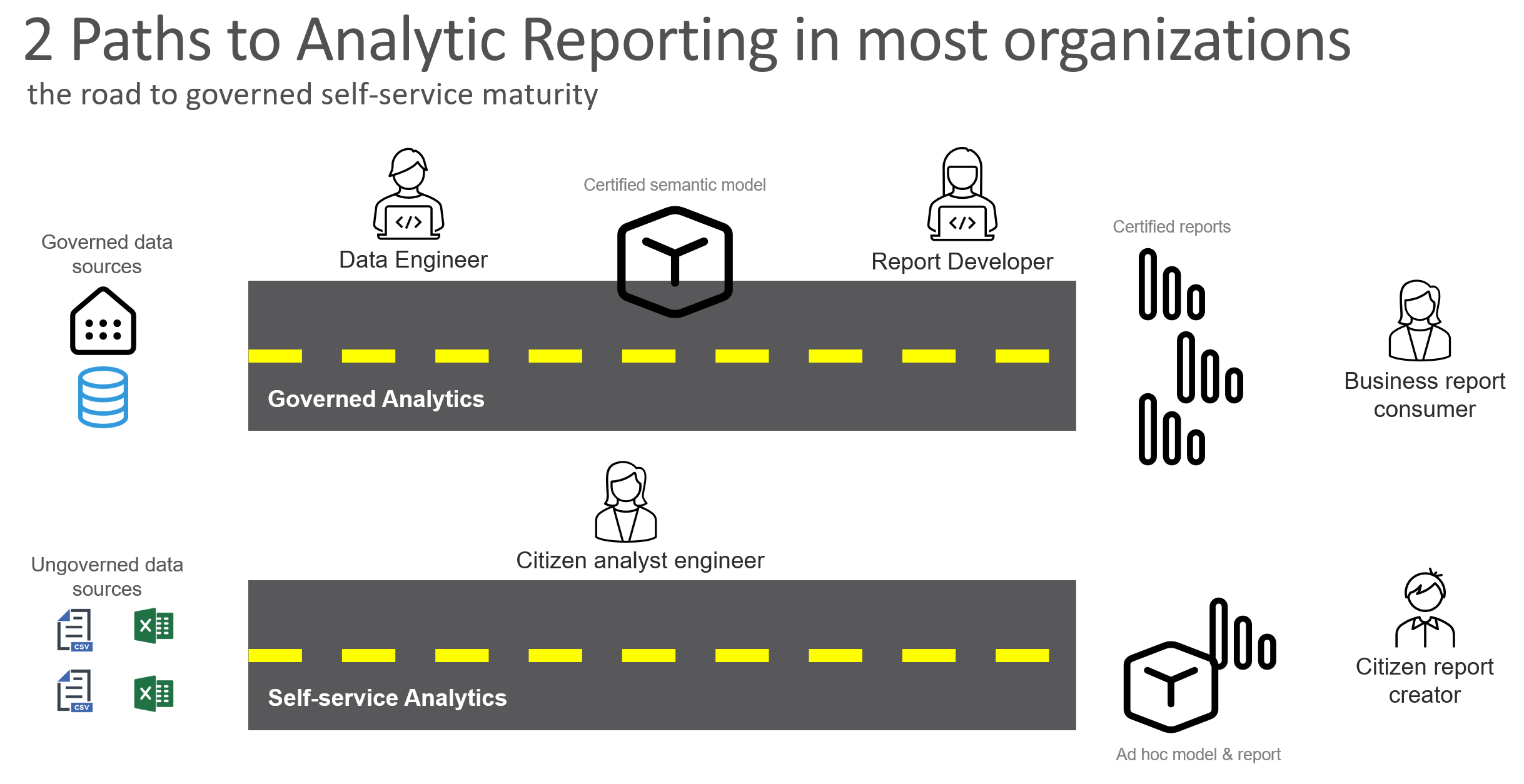
Differentiate between self-service analytics and certified analytic reporting. If 1,000 users create 1,000 reports, there could potentially be 1,000 versions of the truth. Too much democratization is impossible to govern, but too much control is impossible to manage, and business data users need the freedom to do their jobs. There lies a balance between these extremes that is right for your organization.
Advice:
For governed solutions, develop semantic models separately from reports. Use IT-class disciplines employing version control, Git integration and deployment pipelines to test and promote to production. Certify sanctioned models and reports so business users understand they are approved and trustworthy. To support self-service, provide analyst users with a separate set of workspaces for their business unit and small group report and models. Manage the expectations that ad hoc BI assets are not certified for organization-wide use unless developed and governed according to organizational standards.
Don’t use the default semantic models that Fabric generates for a Lakehouse or warehouse. You can turn this feature off. Start creating a new Direct Lake model from the Lakehouse or warehouse designer and then do model design from Power BI Desktop and/or Tabular Editor.
Direct Lake semantic model storage is amazing, enabling scale and large model delivery for enterprise reporting like never before – but it is not a silver bullet for all Power BI solutions. In most cases, import model is still the best choice for most Power BI models. I’ll post later about how and when I think Direct Lake is the better choice. My colleague, Dan Friedman, and I recently worked with an enterprise customer to evaluate Direct Lake and other patterns to manage large semantic models. Dan wrote this excellent article where he reveals the results of an exhaustive comparison between different modeling approaches including Direct Lake.
Architecture Patterns
One size does not fit all projects, nor does it fit all organizational environments, but you can find a starting point and then make adjustments as you continue to adopt and grow with Fabric.
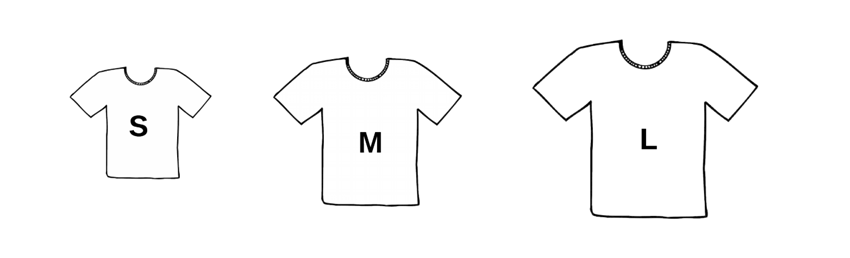
Depending on your needs, a small project might consist of a lakehouse to serve as a landing zone for source files, pipelines to load files, a notebook or dataflows to perform a few transformations and another lakehouse to store curated data that is ready for reporting with Power BI. That might all fit into a single workspace hooked up to a code repository. When development and testing are done, you give users access to reports and you are done until the next revision cycle.
The medium size project might introduce medallion layers to control data movement through a formal data transformation process with the gold layer Lakehouse or warehouse serving as the dimensional model to feed a certified semantic model for analytic reporting with Power BI. Larger projects may utilize a metadata driven framework of coordinated pipelines and notebooks that use a lot of code to manage variables and parameterized queries. By the time your team graduates from small to medium and then to large-scale projects, you should have established your own set of standards and bias for the tools and coding languages you prefer to use in these scenarios. This diagram depicts a typical medallion architecture in Fabric, using a Lakehouse for bronze, to stage raw data, and curated silver layer. Either a Lakehouse or warehouse is used to contain the business-consumable gold layer data.
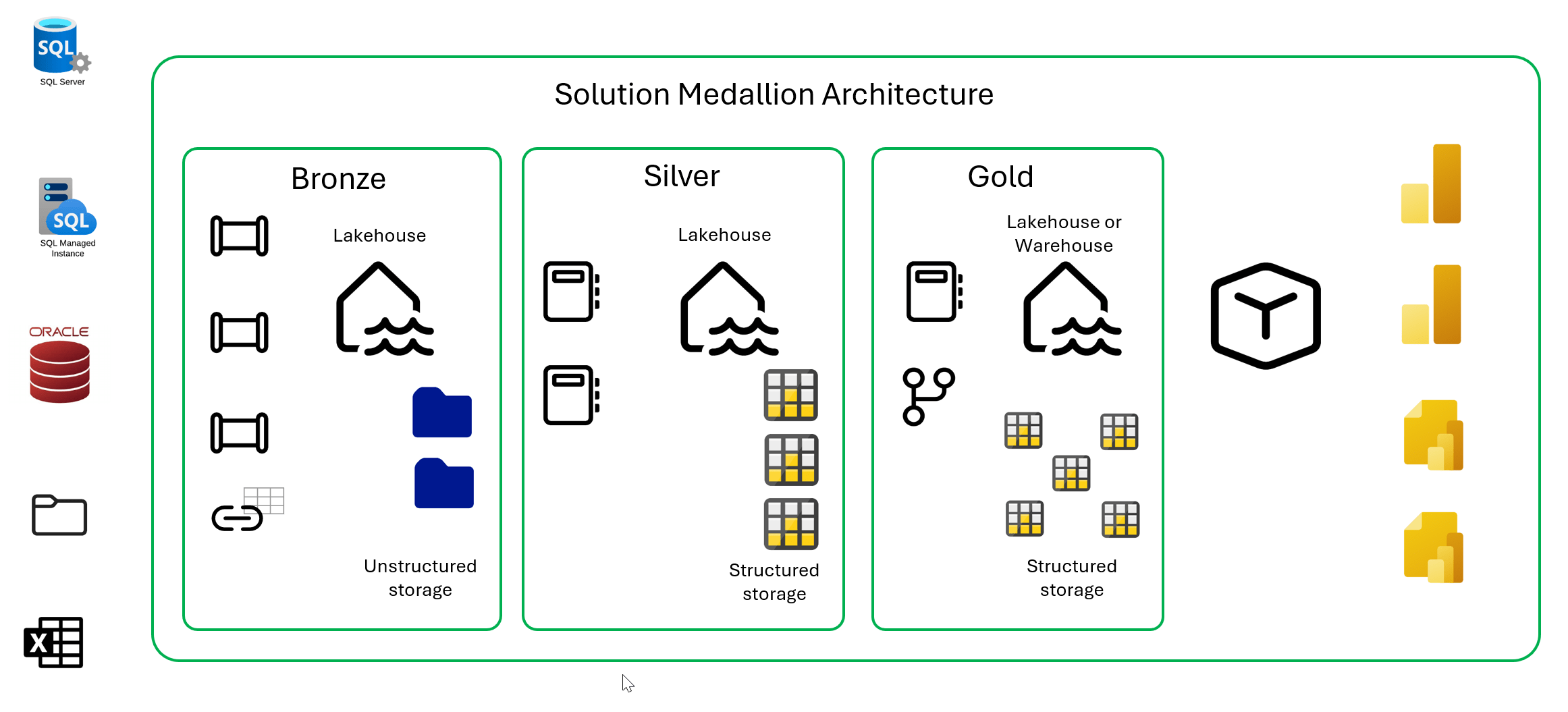
For every project, the architecture should be adapted based on complexity, scale, scope and skills.
Learn to Build and Ship It
Continuous integration & delivery (CICD), version control and Development Operations (DevOps) integration capabilities are built into Fabric, but you have to determine how your team will use them. Adding Git integration to a workspace is simple. The process of product lifecycle management can be as simple or complicated as you need it to be. If your development teams are using GitHub or Azure DevOps, synchronizing Fabric items with a repo is as simple as configuring a workspace to use your Git provider. There are still a few Fabric items that don’t yet work with Git but the core, generally available Fabric assets are supported. If your IT organization uses another Git provider like Bit Bucket or GitLab, those services are not yet integrated with Fabric, and you would be better off switching to GitHub or Azure DevOps until they are.
Use deployment pipelines for promotion from the development workspace to test or QA, and then to the production workspace. Here is the same solution, showing three separate workspaces that are part of a deployment pipeline. Isolating your production capacity will shield business users from development and testing workloads. You don’t have to initially buy multiple capacities but rather than one big one, consider using multiple, and perhaps smaller capacities to manage compute as you grow.
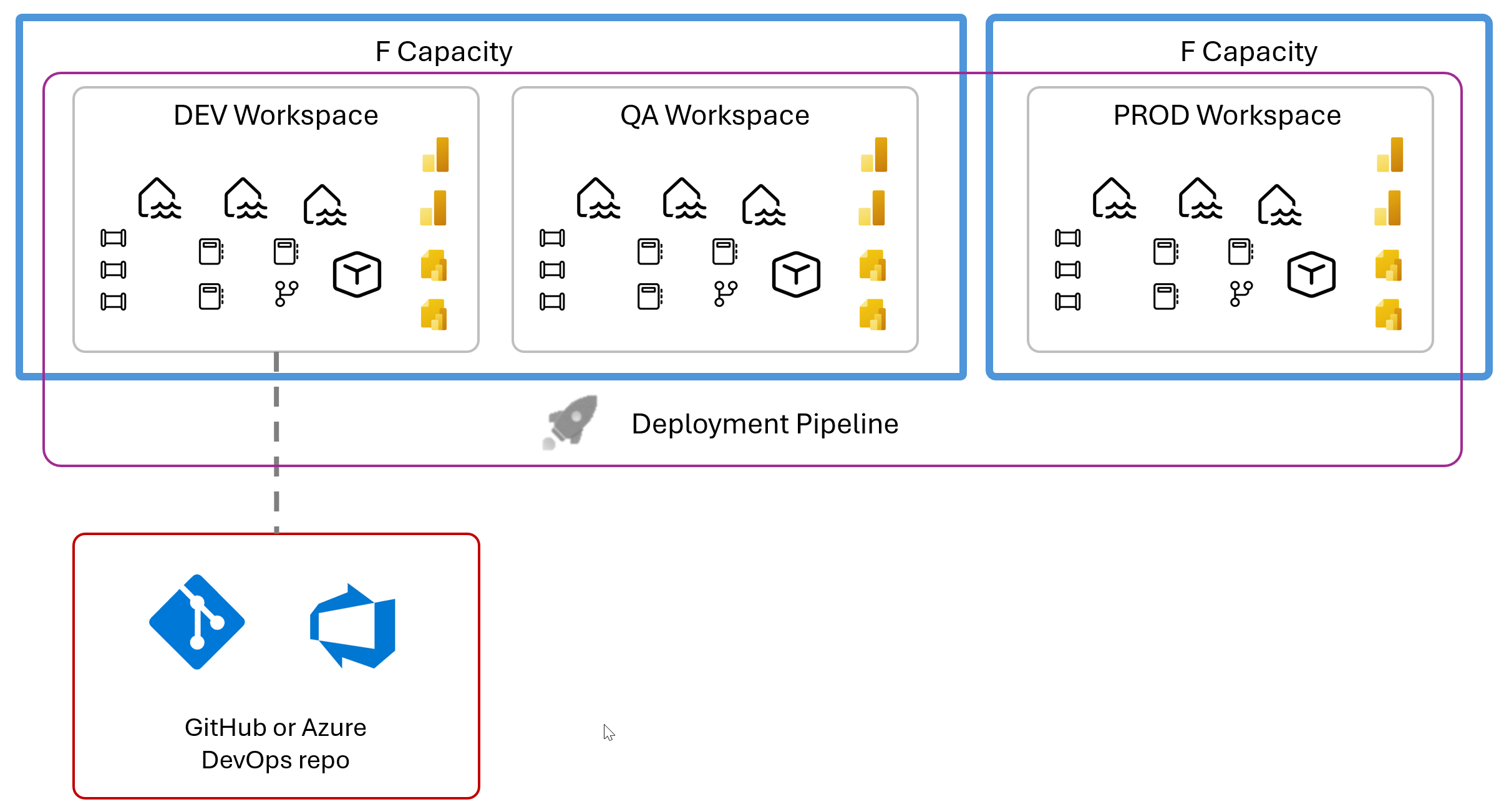
To manage separate deployment environments for release promotion from DEV to TEST or QA and Production, you should use Fabric deployment pipelines. Don’t try to shoehorn environment promotion process into your own release management tool. Embrace the product and use it the way it was designed. you can automate the deployment pipeline workspace content promotion to your build process from Azure DevOps pipelines or any other tool capable of calling REST APIs. The Fabric API documentation is here.
If you are not an IT developer or your organization doesn’t already use DevOps and version control tools, you can still use rudimentary version control methods and manage releases using deployment pipelines by following some simple instructions. The point is to keep the process simple. Learn to crawl, then walk and then run when your team is ready.
Power BI Versioning and Build Management
In addition to release lifecycle management, Power BI now offers to ability to manage all of the objects defined in semantic models and reports using a Power BI project with objects stored in the TMDL format. Developers can use Tabular Editor or VS Code to develop, compare and merge individual objects with full versioning, branching and merging in a code repository.
Power BI is now fully CICD and DevOps enabled using TMDL-based Power BI projects with Git integrated workspaces and deployment pipelines. Self-service BI users aren’t expected to use DevOps tools to create their ad hoc reports but as analyst data users or “citizen developers” create more critical report solutions, they can use simple version management tools like OneDrive and SharePoint for version recovery and then graduate those solutions to formal CICD practices as needed.
Grow with the Platform
A common question we hear is how much of Fabric is ready for prime time use versus features that are incomplete or in some state of preview release. The core Fabric feature set is quite production-worthy and generally available for customers to use with Microsoft’s guaranteed support. However, many attractive features are still in preview. Since Fabric expands as new features are added, the ratio of preview features over generally available features will likely not change any time soon. In other words: Fabric is robust and ready for production use, but the nature of the platform and the Microsoft product culture is that a certain percentage will always be in flux. Welcome to the Microsoft! This is their formula to innovate and remain a market leader.
Advice:
Develop a team culture to incubate new feature adoption while being cautious about becoming reliant on unreleased Fabric features. Work with a partner who has their finger on the pulse of Fabric and enough experience to provide guidance. Build your production solutions with tested and released capabilities while you plan for what’s to come, and don’t get locked into work-arounds and temporary solutions. By knowing what’s on the horizon, you can plan to be flexible and remain in-step with Microsoft and the Fabric platform.